
 Nederlands
 Deutsch

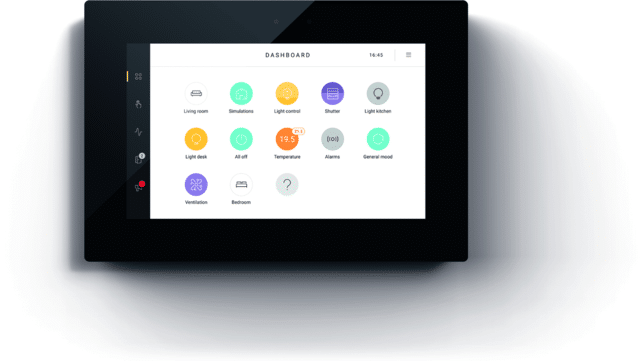
Niko Home Control Touchscreen 550-20102
BrandNIKO
EAN / GTIN5413736429499
Manufacturer ref.550-20103
€897.39 incl. VAT ⭐€741.64 excl. VAT
In stock
Delivery time between: 28, November 2026 - 01, December 2026
Free shippingfrom €200 (Belgium)
Pickup point 24/7Temse, Belgium
Original productsOfficial distributors only
Expert advicePersonal service
Secure paymentMollie
Fast deliveryBpost / DPD
Product description
This touchscreen lets you control the entire Niko Home Control installation clearly from one central point: switch and dim lighting, regulate the temperature, set shutters and sun protection to the desired position, monitor energy consumption and the status of the installation … Thanks to a built-in light sensor, the screen brightness adjusts to the ambient light.
Access control is also possible through the connection with the Niko Home Control video outdoor station. This allows you to answer incoming calls or not and view missed calls. A feedback LED indicates whether you have missed a call, even when the device is in sleep mode.
This new touchscreen (550-20102) completely replaces touchscreen 2 (550-20101). In an existing Niko Home Control installation, it can both replace and supplement the existing touchscreen. Its wired connection to the home network also ensures a permanent connection.
Only one flush-mounting box is required to install the touchscreen. Connect the touchscreen with one twisted-pair cable (UTP, FTP or STP) to the separately available power over ethernet (PoE) power supply. Alternatively, you can install a separate 24Vdc power supply in the cabinet. A total of ten IP devices (touchscreens, smartphone or PC applications) can be connected per installation.
SPECIFICATIONS
Niko Home Control touchscreen.
- Function: The Niko Home Control touchscreen provides residents with a user-friendly interface for operating all functions of the Niko Home Control installation. The icon next to each action displays its current status. The touchscreen also provides a detailed overview of electricity, gas and water consumption when these functions are available in the installation. In combination with the Niko Home Control video outdoor station (550-2100X), access control is also possible from this touchscreen. Thanks to its wired connection to the home network, the touchscreen is always reliable. We therefore recommend providing at least one touchscreen in the installation, in addition to mobile devices. Through the icons on the touchscreen, residents can operate the functions assigned during the installation programming. They can also request information about electricity, gas and water consumption. Connect the touchscreen to the connected controller using a twisted-pair cable such as UTP, FTP or STP. Both the touchscreen and the controller are equipped with an RJ45 jack. Therefore, RJ45 plugs must be fitted to the cable to connect it to the connected controller on one end and to the touchscreen on the other. The touchscreen can be powered via Power over Ethernet (PoE) over the same twisted-pair cable, using the Niko PoE power supply (550-00502). You can also install a separate power cable connected to a separate 24Vdc power supply in the switch cabinet. In that case, in addition to the twisted-pair cable, you need a 24V power cable such as SVV, JYSTY, TPVF or UTP. The touchscreen is not suitable for flush mounting. Mount it on the wall using a standard flush-mounting box with a minimum depth of 40 mm.
- HD colour display
- touchscreen
- Ethernet connection speed: 10 - 100 Mbit/s
- Screen size: 7"
- Screen resolution: 1024 x 600
- Supply voltage: 24 Vdc (± 10 %) (SVV, JYSTY, TPVF, UTP, etc.) or Power over Ethernet (PoE) (UTP, STP, FTP) (48 Vdc)
- Ambient temperature during storage and transport: -10 °C to + 65 °C
- Protection degree: IP20
- Dimensions (HxWxD): 124 x 192.3 mm
- Marking: CE
- Technical data sheets
- Technical manual
Technical data sheetsView the official manufacturer documentation.Open PDF
Add a review
 Niko Home Control Touchscreen 550-20102
Your review
* Review is required
Name
* Name is required
Email
* Email is required
Add photos or video to your review


Reviews
There are no reviews yet